
Guide
Data Center Automation: What It Is and How It Works
Modern data centers rely on thousands of interconnected systems to deliver continuous uptime.
Servers, networking equipment, power infrastructure, cooling systems, and environmental controls all generate a constant stream of operational data, creating more information than teams can manage on their own.
Data center automation helps organizations turn that information into action.
By combining monitoring systems, software platforms, and predefined workflows, automation can do things like:
- Detect changing conditions,
- Trigger alerts
- Generate work orders
- Produce reports
- And automate many of the routine tasks required to keep a facility running efficiently
This guide explains what data center automation is, how it works, the systems that support it. We’ll also cover how organizations are using automation alongside monitoring, inspections, and maintenance to improve reliability across modern data center operations.
What Is Data Center Automation?
Data center automation is the use of software, connected systems, and predefined workflows to perform operational tasks in data centers.
Modern data center automation extends across the entire facility.
It can automate workflows involving IT infrastructure, power systems, cooling equipment, environmental monitoring, maintenance management, reporting, and incident response.
The goal isn’t just to reduce manual work. It’s to help operations teams manage increasingly complex facilities more consistently and respond to developing issues before they affect uptime.
As modern data centers become larger, denser, and more complex, automation is crucial to helping them run efficiently.
How Data Center Automation Works
Most automation programs follow a similar operational workflow:
- Information is collected from connected systems throughout the facility
- That information is evaluated against predefined conditions
- Findings from these evaluations trigger appropriate actions
Depending on the situation, these actions may occur automatically or may require manual review.
The workflow below illustrates how these stages fit together within a connected automation system.
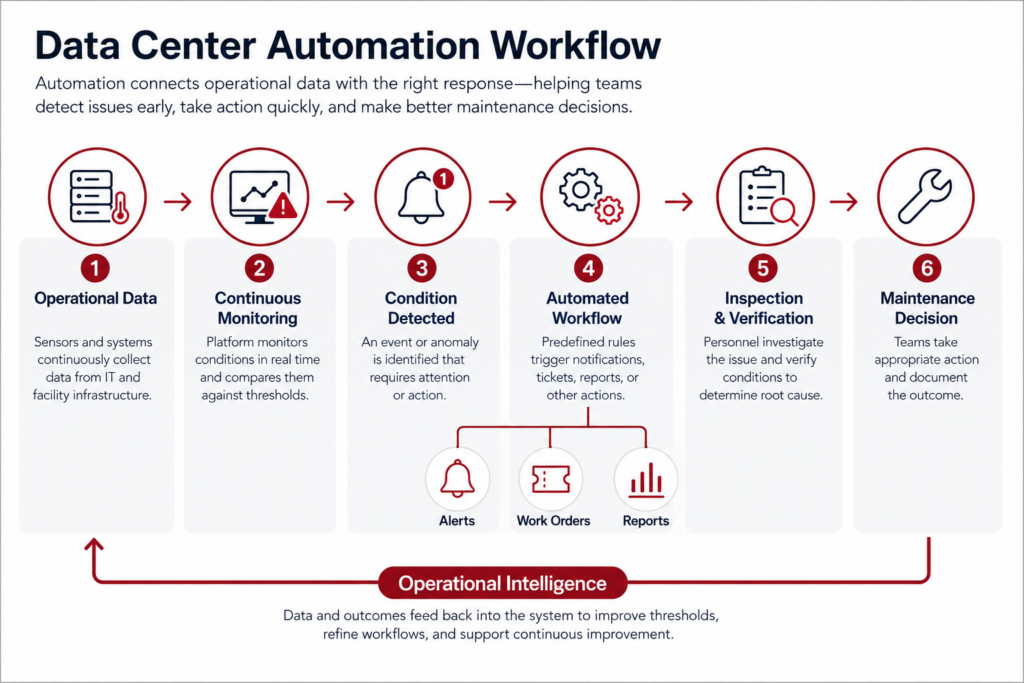
The workflow illustrates an important point: automation doesn’t eliminate people from the process.
It removes repetitive tasks while helping teams focus their expertise on situations that require technical judgment.
What Can Data Center Automation Automate?
The specific capabilities vary between organizations, but most automation programs focus on repetitive, time-sensitive activities where consistency and rapid response provide the greatest operational value.
Here are some common use cases:
- Environmental monitoring by evaluating sensor data and generating alerts when conditions move outside acceptable operating ranges.
- Power and cooling management by initiating predefined responses or notifying facilities personnel when operating conditions change.
- IT infrastructure management through automated provisioning, configuration management, software deployment, and policy enforcement.
- Maintenance workflows by creating work orders, escalating incidents, and documenting operational events automatically.
- Reporting and compliance by collecting operational data continuously and producing standardized reports with minimal manual effort.
Most organizations don’t automate every workflow immediately.
Instead, they begin with high-value processes that improve consistency or reduce repetitive manual work, then expand automation as operational requirements evolve.
Automation Supports People—It Doesn’t Replace Them
One of the biggest misconceptions about data center automation is that it eliminates the need for human oversight.
In reality, automation is designed to support decision-making, not replace it.
Software can monitor systems continuously, recognize predefined conditions, and execute routine workflows, but experienced personnel are still needed to interpret abnormal conditions, determine root causes, and make maintenance decisions.
| Automation Excels At… | People Remain Essential For… |
|---|---|
| Monitoring thousands of data points continuously | Interpreting unusual operating conditions |
| Executing predefined workflows consistently | Determining root cause |
| Generating alerts and work orders | Prioritizing maintenance activities |
| Recording operational events automatically | Making risk-based operational decisions |
| Reducing repetitive administrative work | Inspecting, repairing, and validating physical infrastructure |
The most effective automation programs combine continuous monitoring, automated workflows, targeted inspections, and human expertise to keep critical infrastructure operating reliably.
Why Data Center Automation Matters for Uptime and Operations
For most organizations, the primary goal of data center automation isn’t to reduce headcount or eliminate manual work.
It’s to improve reliability.
Every day, data center teams monitor thousands of interconnected assets, including servers, networking equipment, UPS systems, cooling infrastructure, environmental sensors, and electrical distribution equipment.
And each system generates operational data that can indicate changing conditions long before a failure occurs.
Automation helps teams process that information continuously, ensuring potential issues are identified and routed to the appropriate personnel before they escalate into larger problems.
But—Automation Improves More Than Efficiency
Many organizations initially pursue automation to reduce repetitive administrative work.
But the operational benefits extend a lot further.
By responding consistently to changing conditions, automation helps improve uptime, strengthen maintenance programs, and support better operational decision-making.
Here are five of the main benefits automation provides in data centers:
| Operational Benefit | How Automation Helps | Operational Impact |
|---|---|---|
| 1. Faster Response | Detects abnormal conditions and immediately notifies the appropriate personnel or systems. | Reduces the time between detection and corrective action. |
| 2. Greater Consistency | Executes predefined workflows the same way every time. | Reduces variability and manual process errors. |
| 3. Improved Visibility | Continuously collects and organizes operational data. | Makes emerging trends and developing issues easier to identify. |
| 4. Better Documentation | Automatically records events, alerts, and workflow actions. | Supports audits, compliance, troubleshooting, and historical analysis. |
| 5. More Efficient Maintenance | Prioritizes work based on actual operating conditions instead of routine observation alone. | Helps teams focus resources where they are likely to have the greatest impact. |
Together, these improvements create a more proactive operating environment.
Instead of reacting after equipment performance has degraded, teams gain earlier visibility into changing conditions and can respond before those conditions threaten uptime.
Supporting More Informed Maintenance Decisions
Automation is particularly valuable because it helps organizations shift from reactive maintenance to condition-based decision-making.
Rather than relying exclusively on scheduled rounds or manually reviewing system dashboards, operations teams can use automated alerts to identify equipment and infrastructure that deserve immediate attention.
For example, an unexpected increase in server inlet temperature, recurring cooling alarms, or unusual power readings may indicate an emerging issue.
Automation ensures these kinds of events are surfaced quickly, while maintenance personnel determine the underlying cause.
This approach doesn’t eliminate preventive maintenance programs. But it does help make them more effective by directing attention toward assets that show measurable signs of changing performance.
Automation Works Best Alongside Inspections
One of the most common misconceptions about data center automation is that it replaces inspections.
In reality, automation and inspections perform different—but complementary—roles within a reliability program.
- Automation excels at identifying abnormal conditions, processing large volumes of operational data, and ensuring predefined workflows happen consistently.
- Inspections provide the context that software can’t. They help teams verify equipment condition, identify the root cause of abnormal readings, evaluate physical infrastructure, and determine the most appropriate maintenance response.
Viewed together, automation becomes more than a collection of software tools.
It becomes part of a broader operational strategy that combines continuous monitoring, automated workflows, targeted inspections, and informed engineering judgment to keep critical infrastructure operating reliably.
5 Tasks Data Center Can Automate
Data center automation isn’t limited to a single platform or department.
Most organizations automate a combination of IT operations, facilities management, and maintenance workflows, focusing first on repetitive, time-sensitive tasks where consistency and rapid response provide the greatest value.
Here’s are the five types of tasks that can be automated:
| Operational Area | Common Automation Tasks | Primary Benefit |
|---|---|---|
| 1. Monitoring and Alerts | Evaluate sensor data, detect abnormal conditions, trigger notifications | Earlier detection and faster response |
| 2. IT Provisioning | Deploy servers, configure networks, apply software policies | Greater consistency and fewer manual errors |
| 3. Power and Cooling | Monitor environmental conditions, initiate predefined response workflows | Improved infrastructure reliability |
| 4. Maintenance Management | Create work orders, escalate incidents, assign tasks | More efficient maintenance planning |
| 5. Reporting and Documentation | Generate reports, record events, maintain audit histories | Improved visibility and compliance |
Keep reading for more information on each task type, and how it can be automated.
1. Monitoring and Alerts
Continuous monitoring is the foundation of nearly every data center automation program.
Servers, networking equipment, UPS systems, cooling infrastructure, environmental sensors, and electrical equipment all generate operational data around the clock.
Attempting to review that information manually is both time-consuming and prone to delays, particularly in larger facilities.
Automation allows monitoring platforms to evaluate incoming data continuously instead of waiting for personnel to review dashboards or logs.
2. IT Provisioning and Change Management
Many organizations first adopt automation within their IT infrastructure because provisioning and configuration activities are repetitive, standardized, and well suited to predefined workflows.
Tasks like deploying virtual machines, provisioning servers, applying software updates, configuring network devices, and enforcing security policies can often be performed automatically.
Automating these processes improves consistency while reducing the likelihood of manual configuration errors.
It also allows IT teams to deploy infrastructure more quickly and maintain standardized configurations across large environments, making future maintenance and troubleshooting easier.
3. Power, Cooling, and Environmental Response
Automation plays an equally important role in managing the physical infrastructure that keeps IT equipment operating reliably.
Environmental monitoring systems continuously evaluate conditions such as temperature, humidity, airflow, water intrusion, and power quality, while building management systems monitor cooling equipment and electrical infrastructure throughout the facility.
When operating conditions move outside acceptable ranges, automation can trigger predefined response workflows.
Depending on the facility, those workflows may notify facilities personnel, adjust cooling equipment, escalate alarms, generate maintenance tickets, or document the event for future analysis.
4. Maintenance Management
Automation also improves the way maintenance activities are planned and managed.
Instead of relying entirely on personnel to recognize developing issues and initiate work manually, operational events can automatically create maintenance requests, assign priorities, notify responsible teams, and track progress through completion.
This creates a more structured maintenance workflow while helping ensure that significant operational events are documented consistently.
Over time, historical maintenance records can also help organizations identify recurring issues, evaluate equipment performance, and prioritize future reliability improvements.
5. Reporting and Documentation
Data centers generate enormous amounts of operational information, much of which must be retained for troubleshooting, compliance, performance analysis, or internal reporting.
Manually collecting and organizing that information consumes valuable time and increases the risk of inconsistent documentation.
Automation streamlines this process by continuously collecting operational data, recording system events, and generating standardized reports automatically.
Consistent documentation makes it easier to identify long-term trends, investigate recurring issues, support regulatory or customer audits, and evaluate whether operational improvements are producing measurable results.
The Systems Behind Data Center Automation
Data center automation is rarely built around a single software platform.
Instead, it combines multiple systems that each perform a specific function while sharing information across the broader operational environment.
The exact technology stack varies, but successful automation programs share one common characteristic: they connect operational information rather than leaving it isolated in separate applications.
Here’s an overview of how it typically works:
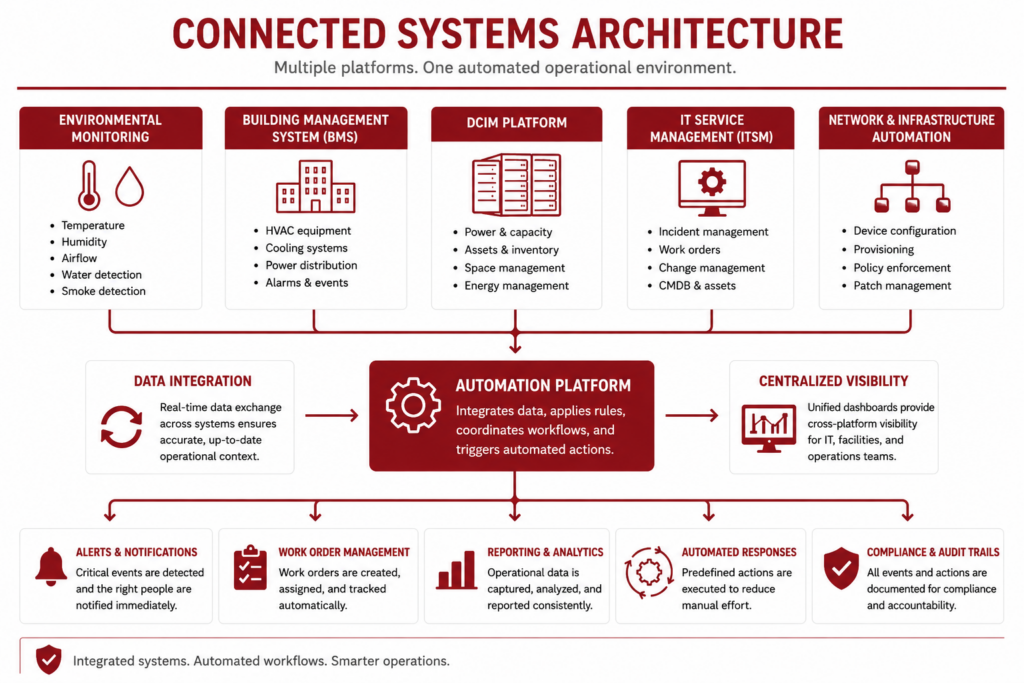
Keep reading for more information on the key pieces needed to create a reliable data center automation program.
Data Center Infrastructure Management (DCIM)
DCIM platforms are often considered the operational hub of a modern data center.
Rather than monitoring a single piece of equipment, they bring together information from multiple systems to provide a centralized view of the facility’s physical infrastructure.
Depending on the platform, DCIM software may track power distribution, cooling performance, rack capacity, environmental conditions, asset inventory, energy consumption, and equipment health.
By consolidating this information into a single operational view, teams can identify relationships that would be difficult to recognize when data remains scattered across independent systems.
Building Management and Environmental Monitoring Systems
Building Management Systems (BMS) and environmental monitoring platforms provide the continuous stream of operational information that makes automation possible.
They monitor the physical conditions required to keep critical infrastructure operating safely, including temperature, humidity, airflow, differential pressure, water intrusion, power quality, and cooling system performance.
Without this information, automation has little to evaluate.
These systems effectively act as the eyes and ears of the facility, detecting changing conditions long before they become visible through routine inspections or equipment failures.
IT Service Management and Asset Platforms
Automation extends beyond monitoring by ensuring operational events become actionable work.
IT Service Management (ITSM) platforms, computerized maintenance management systems (CMMS), configuration management databases (CMDBs), and asset management platforms help convert operational events into structured maintenance and operational workflows.
Instead of requiring personnel to manually create tickets or notify multiple departments, automation can open work orders, assign priorities, route issues to the appropriate teams, document response activities, and maintain a complete history of the event.
Network and Infrastructure Automation Tools
While facilities automation focuses on the physical environment, network and infrastructure automation platforms simplify the administration of IT systems themselves.
Common examples include:
- Server provisioning
- Virtual machine deployment
- Network configuration
- Software deployment
- Patch management
- Policy enforcement
These platforms reduce repetitive administrative work while helping maintain standardized configurations across large environments.
Integration Is More Important Than Individual Platforms
Organizations often focus on selecting the “best” automation platform, but the effectiveness of an automation program depends just as much on how well systems communicate with one another.
Even powerful software has limited value if operational information remains trapped inside isolated applications.
The most mature automation programs integrate monitoring platforms, DCIM software, building management systems, maintenance applications, reporting tools, and IT management platforms into a connected operational ecosystem.
Information collected by one system can immediately support workflows in another, reducing manual effort while giving operations teams a more complete understanding of what’s happening across the facility.
Where Environmental Monitoring Fits in Data Center Automation
Environmental monitoring is one of the most important inputs to a data center automation program because it provides continuous visibility into the physical conditions that support critical IT infrastructure.
While servers, storage systems, and networking equipment perform the computing work, they all depend on stable environmental conditions to operate reliably.
Even small changes in temperature, humidity, airflow, water intrusion, or power quality can develop into larger operational problems if they aren’t identified and addressed early.
Automation transforms environmental monitoring from a passive data collection exercise into an active operational process.
Instead of requiring personnel to review dashboards continuously or perform frequent manual checks, monitoring systems can evaluate thousands of sensor readings in real time, identify meaningful changes, and automatically initiate predefined workflows when conditions require attention.
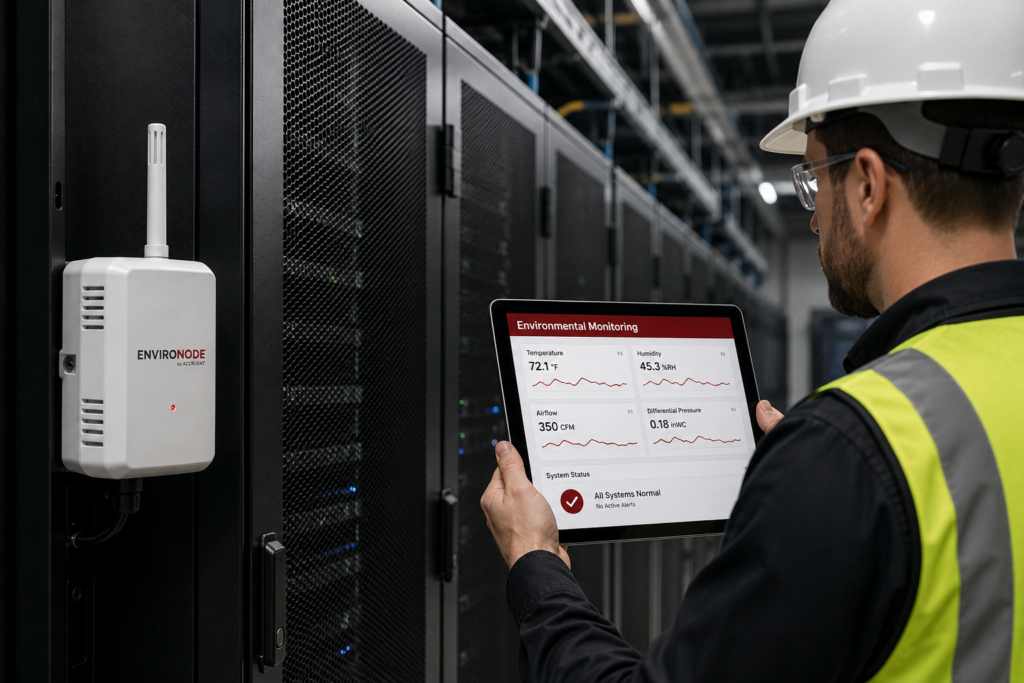
Environmental Monitoring Is the Trigger for Many Automated Workflows
Most facility-related automation begins with sensor data.
Environmental monitoring systems continuously collect information from throughout the data center, allowing automation platforms to recognize abnormal operating conditions long before they become visible during routine inspections or affect equipment performance.
| Environmental Condition | Potential Automated Response |
|---|---|
| Temperature exceeds operating threshold | Generate alerts, notify facilities personnel, create maintenance tickets. |
| Humidity moves outside acceptable range | Escalate alarms and document the event for investigation. |
| Water leak detected | Notify response teams immediately and initiate predefined emergency workflows. |
| Power quality anomaly detected | Alert operations personnel and record the event for analysis. |
| Recurring environmental alarms | Prioritize follow-up inspections or maintenance activities. |
The specific workflows vary between organizations, but the underlying principle remains the same: data center environmental monitoring provides the operational awareness that lets automation respond consistently and quickly.
Monitoring Identifies Problems—It Doesn’t Explain Them
One of the most important concepts in data center automation is that monitoring systems identify that something has changed—not necessarily why it changed.
For example, an elevated temperature alarm may indicate a cooling system issue, restricted airflow, an increase in server load, blocked ventilation, or another developing condition.
Similarly, recurring humidity alarms or abnormal power readings can point to several different underlying causes.
Automation ensures these events are detected quickly and routed to the appropriate personnel, but determining the root cause still requires engineering judgment and, in many cases, physical verification.
Automation Makes Inspections More Targeted
Without continuous monitoring, organizations often rely on scheduled inspections and routine observation to identify developing issues.
While preventive inspections remain an important part of maintaining a reliable facility, they require time and resources, and many inspections ultimately confirm that equipment is operating normally.
Automation helps teams prioritize those efforts.
Instead of inspecting every asset on the same schedule, operations personnel can focus attention on systems that are already showing measurable changes in operating conditions.
How Data Center Automation Supports Predictive Maintenance and Inspections
One of the greatest advantages of data center automation is that it helps operations teams shift from reactive maintenance toward condition-based decision-making.
Instead of waiting for equipment to fail—or inspecting every system on a fixed schedule—organizations can use operational data to identify developing issues earlier and prioritize maintenance where it’s most likely to improve reliability.
The result is a maintenance strategy driven by actual operating conditions rather than assumptions alone.
Here’s how data center automation can drive predictive maintenance:
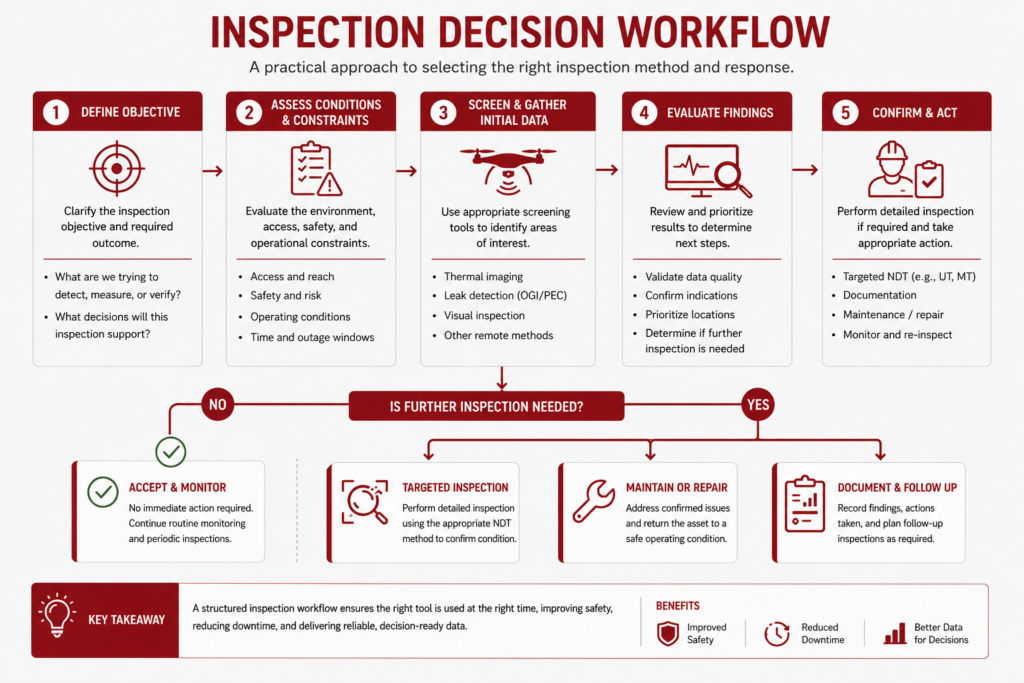
From Scheduled Maintenance to Condition-Based Maintenance
Traditional maintenance programs often rely on calendar-based inspections or routine maintenance intervals.
While these programs remain an important part of facility operations, they don’t always reflect the current condition of the equipment being maintained.
Automation adds another layer of information by continuously evaluating operational data throughout the facility.
Recurring environmental alarms, increasing temperatures, abnormal power consumption, changing airflow patterns, or unusual equipment behavior may all indicate that an asset deserves closer investigation before performance degrades further.
Rather than inspecting every system with the same frequency, operations teams can prioritize equipment showing measurable signs of changing performance.
Automation Helps Prioritize Inspections
One of the biggest challenges facing facilities teams is deciding where to spend limited inspection time.
Even relatively small data centers contain hundreds or thousands of assets that could potentially require attention, making it impractical to investigate every minor change manually.
Automation helps solve this problem by filtering large volumes of operational data and highlighting the events most likely to require follow-up.
Instead of searching for potential issues, inspectors can begin with assets that have already demonstrated abnormal operating conditions.
| Automation Detects | Inspection Helps Determine |
|---|---|
| Recurring temperature increases | Whether cooling performance, airflow, or equipment loading is responsible. |
| Abnormal power readings | Whether electrical infrastructure or connected equipment requires attention. |
| Repeated environmental alarms | Whether changing facility conditions represent an isolated event or an emerging trend. |
| Unexpected equipment behavior | Whether maintenance, repair, or continued monitoring is the appropriate response. |
Inspections Turn Data into Decisions
Automation can identify that something has changed, but it rarely explains the full story.
Determining the root cause of an abnormal condition still requires technical expertise and, in many situations, direct inspection of the affected equipment or infrastructure.
Depending on the situation, follow-up work may involve thermal imaging, remote visual inspection, electrical testing, airflow assessments, environmental measurements, or other inspection methods that provide additional context.
These inspections help verify whether an alert represents a temporary operating condition, a developing equipment issue, or a maintenance problem that requires corrective action.
Viewed this way, automation and inspections aren’t competing approaches. They’re complementary parts of the same reliability strategy.
Automation identifies where attention is needed, while inspections provide the information necessary to make confident maintenance decisions that protect uptime and extend equipment life.
How to Build a Working Data Center Automation Program
Most successful data center automation programs are built incrementally rather than all at once.
The objective isn’t to automate everything possible.
It’s to automate the activities that improve operational consistency, reduce manual effort, and help personnel make better decisions while maintaining appropriate oversight of critical infrastructure.
For most organizations, the journey looks something like this:
| Stage | Primary Goal | Typical Activities |
|---|---|---|
| Monitor | Build operational visibility | Deploy sensors, integrate monitoring platforms, establish performance baselines. |
| Detect | Identify meaningful events | Define thresholds, identify abnormal conditions, prioritize operational alerts. |
| Automate | Standardize routine responses | Generate work orders, notify personnel, automate reporting, trigger predefined workflows. |
| Inspect & Verify | Understand the underlying cause | Perform targeted inspections, validate alerts, assess equipment condition, determine corrective actions. |
| Optimize | Continuously improve operations | Analyze trends, refine workflows, adjust thresholds, improve maintenance strategies. |
Here are some tips for getting started:
1. Start with Reliable Operational Data
Every automation program depends on accurate, timely information.
Before organizations can automate workflows confidently, they need reliable monitoring systems that provide consistent visibility into both IT infrastructure and facility operations.
This often begins with environmental monitoring, power monitoring, cooling system monitoring, DCIM platforms, or other systems that establish a dependable operational baseline.
Without trustworthy data, even well-designed automation workflows can generate unnecessary alerts or overlook developing issues.
2. Automate High-Value, Repetitive Workflows First
Organizations often achieve the fastest return by automating repetitive administrative tasks rather than complex operational decisions.
Activities like generating work orders, notifying personnel, escalating alarms, documenting events, and producing standardized reports are highly repeatable and benefit from consistent execution.
Successfully automating these workflows can allow teams to reduce manual effort while building confidence in their automation strategy before expanding into more sophisticated integrations.
3. Expand Automation as Operational Processes Mature
As automation becomes part of daily operations, organizations typically begin connecting additional systems.
Monitoring platforms exchange information with DCIM software.
- Maintenance systems receive automatically generated work orders.
- Building management systems share data with reporting platforms.
- IT and facilities teams gain greater visibility into one another’s activities.
This gradual integration creates increasingly connected workflows without requiring a complete redesign of existing operational processes.
4. Measure Success by Better Decisions—Not More Automation
One of the most common implementation mistakes is measuring success by the number of automated workflows or software integrations.
In practice, automation only creates value when it helps organizations operate more effectively.
Successful automation programs reduce response times, improve documentation, strengthen maintenance planning, and help personnel focus attention where it’s needed most.
If automation generates unnecessary complexity or overwhelms teams with alerts, additional automation is unlikely to improve outcomes.
5. Think of Automation as an Ongoing Process
Data center automation isn’t a one-time technology project.
It’s an operational capability that evolves alongside the facility itself.
As infrastructure grows, workloads change, and new monitoring technologies become available, automation strategies should continue evolving as well.
Organizations that approach automation as a continuous improvement process—rather than a one-time implementation—are better positioned to increase reliability, improve operational efficiency, and support informed maintenance decisions over the long term.
Data Center Automation FAQs
Here are answers to some of the most commonly asked questions about automating work for data centers.
What is data center automation?
Data center automation is the use of software, connected systems, and predefined workflows to perform operational tasks with minimal manual intervention. Organizations use automation to monitor infrastructure, generate alerts, create work orders, automate reporting, manage IT resources, and coordinate operational processes more consistently. The goal is to improve reliability and operational efficiency while helping teams respond more quickly to changing conditions.
What is the difference between monitoring and automation?
Monitoring collects operational data, while automation acts on that information. For example, an environmental monitoring system may detect that temperatures are rising within a server aisle. An automation platform can then notify personnel, generate a maintenance ticket, document the event, or initiate another predefined workflow. In short, monitoring provides visibility, while automation provides action.
What is orchestration in a data center?
Orchestration coordinates multiple automated workflows across different systems. Rather than automating a single task, orchestration connects platforms such as DCIM software, environmental monitoring systems, building management systems, and IT service management tools so they can work together as part of a larger operational process.
Is DCIM the same as data center automation?
No. DCIM (Data Center Infrastructure Management) is one component of a broader automation strategy. DCIM platforms provide centralized visibility into physical infrastructure and often serve as a hub for operational information, but organizations typically combine them with environmental monitoring systems, building management systems, IT service management platforms, and other software to create comprehensive automation workflows.
What are the biggest benefits of data center automation?
The biggest benefits include improved operational consistency, faster response to abnormal conditions, reduced manual effort, more reliable documentation, stronger maintenance planning, and better visibility into facility performance. When implemented effectively, automation also helps operations teams make more informed decisions by ensuring critical information reaches the right people quickly.
Can data center automation reduce downtime?
Yes, but indirectly. Automation helps reduce downtime by detecting abnormal operating conditions earlier, accelerating response times, standardizing operational workflows, and helping teams address developing issues before they lead to equipment failures or service interruptions. Automation supports reliability, but it doesn’t eliminate the need for inspections, maintenance, or sound operational practices.
Can data center automation replace inspections?
No. Automation helps identify conditions that deserve attention, but inspections remain essential for verifying equipment condition, determining root causes, and planning corrective actions. Automation and inspections work best together, with automation identifying where attention is needed and inspections providing the information required to make informed maintenance decisions.
How do organizations typically get started with data center automation?
Most organizations begin by automating repetitive, high-value workflows such as environmental alerts, work order creation, reporting, or IT provisioning. As monitoring systems, operational processes, and software integrations mature, they gradually expand automation to support more sophisticated workflows across both IT infrastructure and facility operations.
 English
  English (Canada)
  Français du Canada